Injection site rotation: how to keep track without a body map
Rotation works when the order is fixed in advance, because nobody recalls last week's site reliably. Peptrend saves a site with every dose, builds your rotation list from the sites you pick, and suggests the next one by indexing that list with your dose count, wrapping at the end. A round-robin by count: no body map, no clock, and no warning that a site is overworked.
Every injection you log in Peptrend carries a site field — a plain name like “Thigh - Left”, picked from a list, stored on the dose. One thing is built on top of that record: a suggestion for where the next one goes.
Does the injection site change how much drug you get?
Similar exposure at every site, according to both labels — which then tell you to rotate anyway. Both claims sit in the same label, a few sections apart. Section 12.3 of the tirzepatide label reports similar exposure whether the injection goes into the abdomen, the thigh or the upper arm; the semaglutide label says the same for its three sites. Then section 2 of the tirzepatide label instructs: “Rotate injection sites with each dose.” Semaglutide’s asks for a different site each week when you stay in one body region.
The two answer different questions. Exposure equivalence is about how much drug arrives. Rotation is about what repeated injections do to the tissue they pass through, a question about where the needle went rather than what it delivered. Only the second is a record-keeping problem, and it is all a tracker can touch.
Nothing in Peptrend reads that instruction or enforces it. The app keeps a record and offers one suggestion, and the suggestion is easy to overrule.
Why rotate injection sites at all?
The evidence comes from insulin, not from GLP-1s. Blanco and colleagues examined 430 insulin-injecting outpatients for the 2013 paper in Diabetes & Metabolism: 64.4 % had lipohypertrophy, and of those, 98 % either did not rotate sites or rotated incorrectly. Among the patients who rotated correctly, 5 % had it. The patients with lipohypertrophy also reported unexplained hypoglycaemia at 39.1 % and glycaemic variability at 49.1 %, against 5.9 % and 6.5 % in those without.
Several things limit how far that carries here. It is a different drug, injected several times a day rather than once a week, measured more than a decade ago, in people with diabetes. The tirzepatide and semaglutide labels tell you to rotate without pointing at a comparable dataset of their own. What the insulin work does establish is that how carefully you rotate matters.
“Properly” has a documented shape. Kalra and colleagues, writing in Diabetes Therapy in 2023, describe the widely used scheme as dividing the abdomen into quadrants or the thigh, buttock and arm into halves, using one per week and moving to the next in a consistent direction, with consecutive injections at least 1–2 cm apart. A fixed order, decided in advance. That is the part software can carry for you.
Where does your rotation list come from?
From the sites you pick, one dose at a time. The site is one of nine fields on a dose, and it starts as “Unknown”. Open the picker on a fresh install and you get eight built-in names — Abdomen, Thigh, Upper Arm and Glute, each split Left and Right. Save an injection with any of them and that name joins your rotation list. The in-app footer says so plainly: “Sites you pick here get saved to your rotation, and the Next Dose card suggests the next one.” On an injection medication that card is headed Next Shot; the noun follows the route you picked.
Position in the list is assigned as each name is added, so the cycle runs in the order you first used each site. Oral doses never add one — the picker disappears entirely for a tablet, and switching an existing dose to oral clears the site along with the vial link and the pain level, because a swallowed tablet has no site to rotate.
There is no settings screen for sites. You cannot rename one, reorder them, or delete one from the list; the list is whatever you have picked, plus whatever an import brought in. What to log with every dose covers the other eight fields and what each one answers later.
How does the app pick the next injection site?
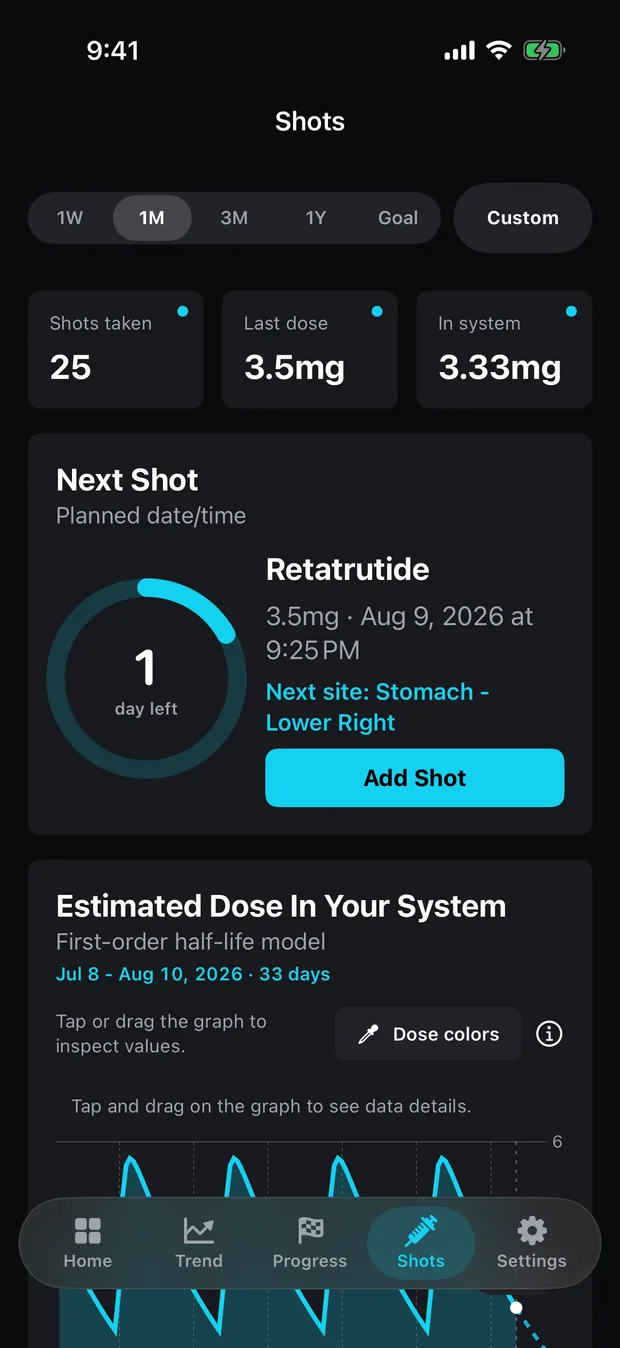
The Next Shot card takes your site list, indexes it with the number of doses in your history, and wraps round at the end. Six saved sites and thirty doses gives you the first name; thirty-one gives you the second. That is the whole mechanism.
The screenshot below is the arithmetic in public. A seven-name list runs Stomach - Upper Left, Upper Mid, Upper Right, Lower Left, Lower Right, then Thigh - Left and Thigh - Right, and the dose count picks one out of it. Take that count mod seven and the card names the entry it lands on — here, the fifth: Stomach - Lower Right.
Two consequences follow from counting doses rather than reading a clock. The count includes doses you marked as not taken, so a planned dose you logged and skipped still advances the cycle. And no interval enters the calculation at all: two doses in one day move the pointer twice, a six-week gap moves it once. On an oral medication, or before you have saved a single site, the line does not appear.
What the next-site suggestion does not know
The card computes an index and prints a name. Everything in the left-hand column below is something it never attempts.
| What you might expect | What actually happens |
|---|---|
| It avoids a site you used two days ago | No time value enters the calculation. The index is a count of doses. |
| It notices when you ignore the suggestion | Nothing corrects. The pointer advances by one either way, and the site you actually picked joins the list if it is new. |
| It shades a body map by recent use | There is no map and no diagram. A site is a string of text. |
| It warns that a site is overworked | No warning of any kind exists — no counter per site and no fatigue model. |
| Adding a new site leaves the cycle intact | A new name lands at the end, which changes the divisor, so the same dose count now points somewhere else. |
| Deleting an old dose leaves the pointer alone | The count drops by one, so the suggestion moves back a step. |
If a body outline is what you want, other GLP-1 trackers advertise one: Shotsy’s product page describes rotating sites on a simple visual map, and says it suggests the next site in your rotation from where you have injected before. Shotsy against Peptrend sets the two feature sets side by side. Peptrend records the site and cycles the list, and that is the end of its involvement.
Do injection sites survive import, export and sync?
Three routes in and out, none of them a body map.
Import. The JSON importer reads the site on each dose and also seeds your rotation list from the exporting app’s own rotation key, skipping any name containing “unknown”. Imported names arrive in alphabetical order, and since position is assigned on insertion, that order becomes your cycle order. The duplicate check on a dose includes its site, so the same injection logged at two sites imports as two rows.
Export. The JSON export carries the site on every dose, and leaves out the site list itself, the pain level, the vial link and the delivery method. It is a partial record of what you logged.
Sync. Injection sites are one of seven record types mirrored through your own private CloudKit database, and the de-duplication pass covers them, so two devices do not settle on two copies of “Thigh - Left”. There is no account and no server of the app’s own; the privacy page has the full accounting. The same restraint runs through the reconstitution calculator, which refuses to turn a dose into a draw volume.
Can you log which sites hurt?
Turn on “Did it hurt?” on an injection and you get a 0–10 stepper. That is the entire feature. Nothing charts it, no rule connects a painful dose to the site it was given at, and the value is left out of the JSON export. You read it back by opening the dose.
That makes it a note to yourself in numeric form, useful for exactly one thing: answering “was it that site, or that vial?” when a run of injections stings. The dose history prints the site above the weekday and time on every injection row that carries one, so the pairing is there to be read even though nothing reads it for you. Half-life and steady state covers what the app does compute from your dose history.
Common questions
Is there an injection site rotation chart or a body map?
No. A site is a plain text name attached to a dose, chosen from a picker. There is no anatomical diagram, no heat map of recent use, and no warning when one site is being overworked. The suggestion is arithmetic on a count, and you are free to ignore it.
How does Peptrend decide which injection site to suggest next?
It takes your saved site list and indexes it with the number of doses in your history, wrapping round at the end. With six saved sites, thirty logged doses gives you the first name and thirty-one gives you the second.
Do I need to rotate if I only inject in my stomach?
The scheme Kalra and colleagues describe divides the abdomen into quadrants, uses one per week, moves through them in a consistent direction and keeps consecutive injections 1–2 cm apart — so rotating inside one region is most of what the scheme asks for. Peptrend's built-in names split the abdomen left and right; finer quadrant names arrive through JSON import.
Can I add my own injection site names?
The dose picker offers eight built-in names plus every site you have already used, and picking one saves it to your rotation. Names outside that set arrive through JSON import, which seeds the list from the exporting app's own rotation.
Sources
- Mounjaro (tirzepatide) prescribing information, DailyMed
- Ozempic (semaglutide) prescribing information, DailyMed
- Blanco et al., Prevalence and risk factors of lipohypertrophy in insulin-injecting patients with diabetes, Diabetes & Metabolism 39(5):445–453 (2013)
- Kalra et al., Optimising Insulin Injection Techniques to Improve Diabetes Outcomes, Diabetes Therapy 14(11):1785–1799 (2023)
- Shotsy GLP-1 Tracker product page