What should you log with every GLP-1 dose? Nine fields
Nine things, every time: medication name, dose in milligrams, date and time, delivery method, injection site, the vial it came from, whether it was actually taken, an optional 0–10 pain level, and a colour. Every one is a typed value with a fixed shape, which is what lets the charts read them back — and there is no free-text note anywhere on a dose.
A dose log answers questions about the past. It decides nothing about the future: Peptrend never recommends a dose, never builds a titration schedule, never works out what to draw from a vial. What follows is what the app stores when you tap Save, field by field, and the question each one exists to answer months later.
What does the app store when you save a dose?
Saving a dose writes nine values you chose, plus timestamps and an identifier you never see.
| Field | What you enter | What it answers later |
|---|---|---|
| Medication | Free text, pre-filled from your current medication | Which doses belong to the same curve |
| Dose | A number, always in mg | How much the level estimate carries, and how the dose is shaded |
| When | Date and time of day | Where the dose sits on the absorption curve, and when the next is due |
| Delivery method | Injection, SubQ, IM, Pen or Oral | Whether the dose is absorbed whole or scaled down for a tablet |
| Injection site | Picked from your rotation, or Unknown | Where the needle has been going |
| Vial | One of your saved mixes | Which batch a dose came from, and at what mg/mL |
| Already taken? | On or off | Whether the dose counts toward the estimate and the rate maths |
| Pain | 0–10, injections only | Nothing automatic — you read it back on the dose itself |
| Colour | A hex, or set by the dose ramp | Which dose level is which, at a glance |
There is no notes box on a dose. A vial can carry a short label, so anything you want to write down belongs on the mix. That absence keeps the history legible: the app groups rows by month, numbers each dose in one chronological pass, and prints the site — when the dose has one — above the weekday and time, because every one of those values has a type.
Does the time of day matter?
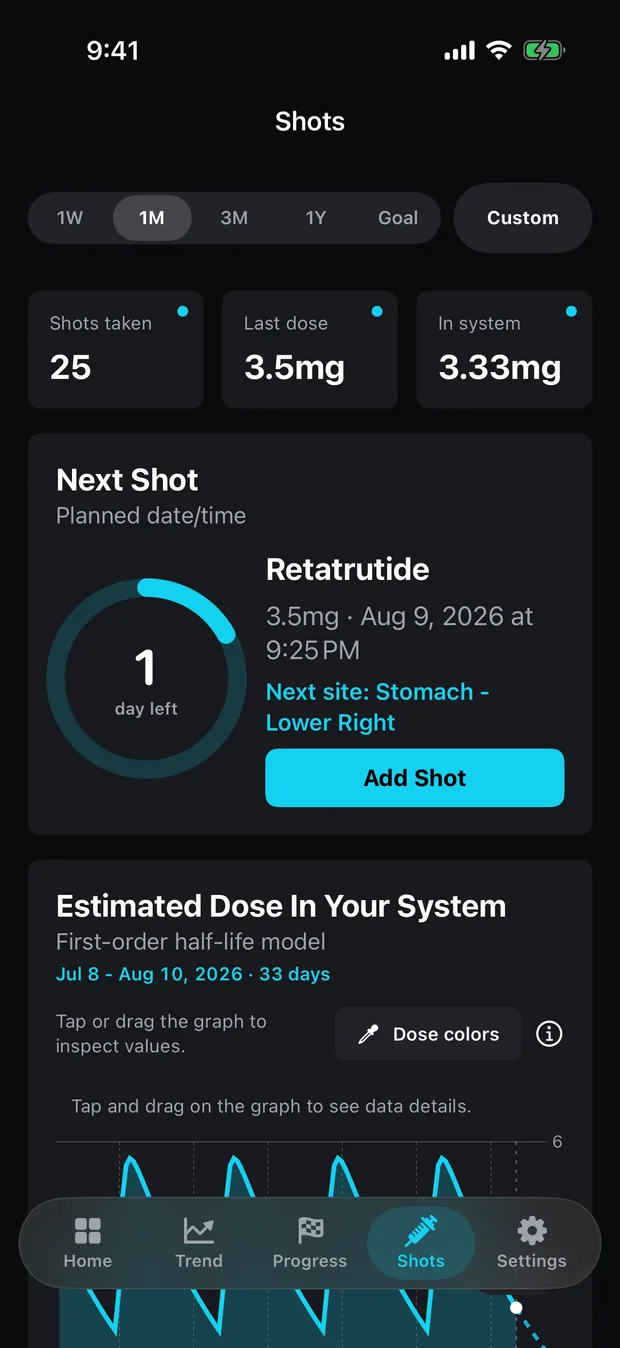
The date picker takes a time of day as well as a date, and the absorption curve is built at finer resolution than a day. Peptrend solves the absorption rate constant numerically from the medication’s published Tmax, then walks the historical curve on a 6-hour grid for the 1-week and 1-month ranges. A dose logged at 9 a.m. and one logged at 9 p.m. sit at different points on it.
Keep the difference in proportion. Semaglutide reaches its maximum concentration 1 to 3 days after a dose; for tirzepatide the label gives a range of 8 to 72 hours. Against spreads that wide the hour is a small correction — and it costs nothing to get right.
The countdown ring reads the same timestamp. It counts in days for a weekly medication and switches to hours when the interval drops to a day or less, which only works if an hour was stored. Forward of today the projection runs 6-hourly for a week, then 12-hourly, out to ten half-lives. When a dose peaks after an injection covers what that shape does and does not mean.
Why does the medication name have to match every time?
A dose counts toward the in-system estimate when its own name contains the medication name from settings, ignoring case. Put “Semaglutide” in settings and a dose logged as “Semaglutide 0.5” still lands on the curve; one logged as “Sema” falls off it, because the test runs in that direction only. Type the name loosely and you end up with two histories where you meant one.
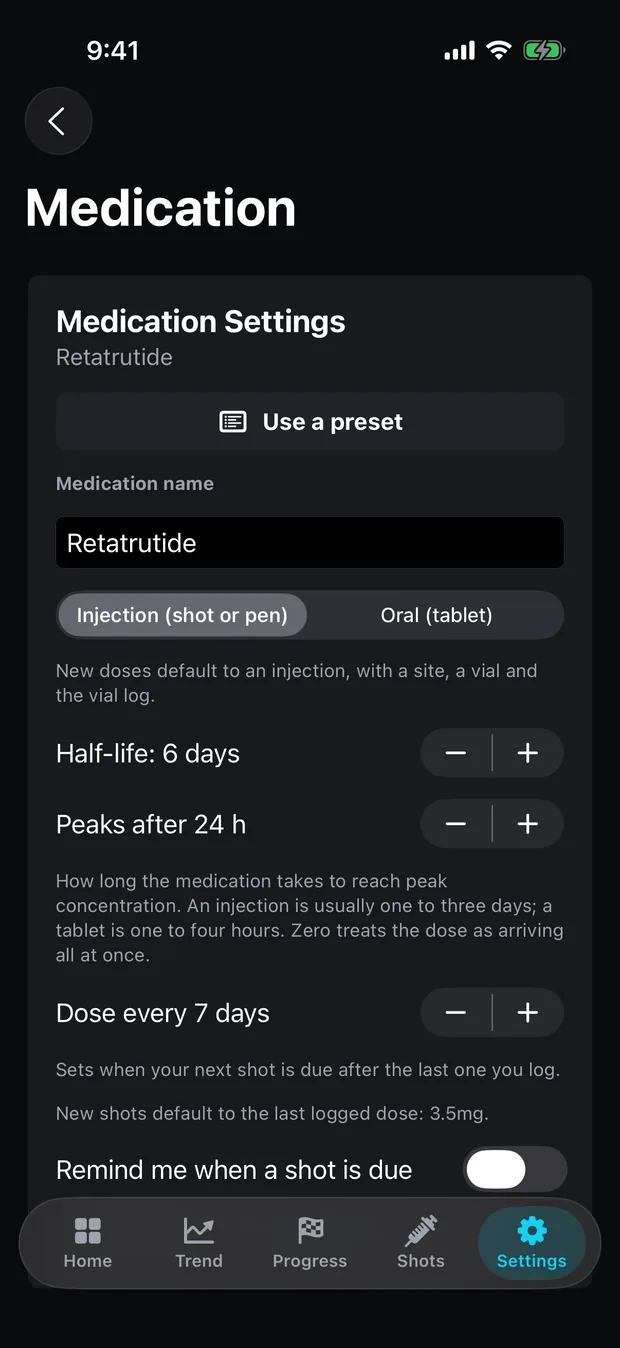
The pharmacokinetics do not live on the dose. Half-life, Tmax and oral bioavailability are medication settings, drawn from eleven built-in presets or set by hand, with half-life adjustable anywhere from 0.05 to 30 days. The dose row stores a name and a number, settings supply the decay, and the name is the only thing joining the two.
Switch drugs and that split shows: the estimate recomputes over whichever past doses carry the new name, while doses under the old one stay in your history and leave the curve. How long a GLP-1 takes to reach steady state works through what the curve does once several doses overlap.
Why is every dose in milligrams?
Dose is always milligrams. The app has no unit picker for dose and no IU or mcg support anywhere, which removes a whole category of logging error at the cost of one conversion up front. Through version 1.3.3, a dose below 10 mg displays to one decimal place, which shows 0.25 mg as 0.2. Coming in 1.4.0, a dose displays as it was typed, to at most three decimal places: 0.25 mg reads 0.25, and 12.5 mg reads 12.5.
Those milligrams then do two jobs. The first is the level estimate, which decays each milligram figure and adds up what is left. The second is colour. In the preset and custom ramp modes, shade is a pure function of dose: your lowest logged dose sits at the bottom of the gradient, your highest at the top, everything else between. A single-dose history pins to the middle so the colour holds steady.
A typo therefore rescales the picture. Log 35 mg where you meant 3.5 and every other dose slides toward the bottom of the ramp, because the top of the scale just moved tenfold. On the Dose Over Time chart the legend collapses to one chip per distinct dose level, so a titration ramp reads as a ramp — charting a titration shows what that looks like across a real escalation.
What does choosing injection or oral change?
Five options ship: Injection, Subcutaneous (SubQ), Intramuscular (IM), Pen and Oral. Internally they collapse to two routes, deliberately lopsided: anything not literally the word “oral” is treated as an injection. The reason is arithmetic. The semaglutide tablet preset carries an oral bioavailability of 0.008, so a misread route would scale a real injected dose down more than a hundredfold and quietly flatten the curve.
Route also drives the editor. Pick oral and the site, vial and pain fields vanish, because a swallowed tablet has no site to rotate and no bottle to draw from. Switch an existing dose to oral and those three values are cleared rather than left dangling, which stops a vial counting a tablet against its own draw total.
The vocabulary follows the route as well: injections put “Shots” on the tab behind a syringe icon, tablets put “Doses” there behind pills. None of that renaming touches stored data, so moving from a pen to a tablet redresses the interface and leaves every past record intact. Weekly injections against daily tablets covers what changes on the charts when the interval shrinks.
Why log the injection site if the labels say exposure is similar?
Both labels say the same thing: similar exposure is achieved whether semaglutide or tirzepatide goes into the abdomen, the thigh or the upper arm. Yet the tirzepatide label still instructs, in section 2.2, to “Rotate injection sites with each dose”. The concern is what repeated injections do to the tissue underneath, and answering that months later takes a record of where the needle went.
The evidence comes mostly from insulin. Gradel and colleagues, reviewing subcutaneous insulin absorption in the Journal of Diabetes Research in 2018, report a coefficient of variation for peak concentration of 55 % when insulin went into lipohypertrophic tissue, against 15 % in normal tissue. Different drug, far more injections per week, no GLP-1 equivalent to point at — and still a good argument for keeping the site written down rather than remembered.
Peptrend keeps that record and no more. Sites are learned from what you pick: save an injection with a site the app has not seen before and it joins your rotation list, while oral doses never add one. The Next Dose card then steps through that list by dose count, a plain round-robin with no memory of when each site was last used. Injection site rotation sets out what the suggestion does and does not know.
Which vial did that dose come from?
Tagging a dose with a vial ties it to a saved mix: strength in mg, bacteriostatic water in mL, the date and time you mixed it, and an optional label. One number is derived from those, strength divided by water, shown to two decimals in mg/mL beside the vial picker in the dose editor.
It stops there. The app never turns your dose into a volume to draw, in millilitres or insulin units — that calculation was removed on purpose, and why a calculator should refuse explains the App Review boundary behind it.
What the link buys is retrospect. The vial history card counts the doses drawn from each mix, so a batch that fed eight doses looks different from one that fed two, and deleting a vial untags its doses instead of deleting them. Tracking a vial end to end follows one from mixing to the last draw.
What does the “Already taken?” toggle change?
The taken toggle is the one that changes the maths. Untaken doses stay in your history and are excluded from the in-system estimate and from the rate calculations, and the next-dose date is anchored to your last taken dose. Log a planned dose as taken and then skip it, and the estimate carries milligrams that never entered you while the countdown restarts from a dose that never happened.
Pain is the plainest field in the app. It appears only for injections, only once you turn on “Did it hurt?”, and it steps from 0 to 10. Nothing charts it, nothing warns on it, and it is left out of the JSON export. You read it back by opening the dose, which is enough to answer “was it that site, or that vial?” after a run of sore injections.
Both fields are free, as is every dose you log, the whole history list, and the colour you pick while logging it; what stays free draws the line between the record and the analysis built on it. The record also stays with you, syncing through your own private CloudKit database with no Peptrend account and no server of the app’s own. The privacy page has the full accounting.
Common questions
Can I add a note to a dose in Peptrend?
No. A dose is nine typed fields and nothing else — there is no free-text note. A vial can carry a short label, so if you want to write something down, write it on the mix.
Can I log a dose in units instead of milligrams?
No. Dose is always milligrams. There is no unit picker for dose anywhere in the app, and no IU or mcg support.
What happens if I log a dose I ended up not taking?
Leave the 'Already taken?' toggle off. Untaken doses stay in your history but are excluded from the in-system estimate and from the next-dose calculation.
Does Peptrend warn me when I have overused an injection site?
No. The Next Dose card steps through your saved list by dose count — a plain round-robin whose position is set by how many doses you have logged. It does not track site fatigue and has no anatomical model.