
How fast is too fast to lose weight? The 1.5 lb/week cap
Peptrend refuses any weight plan faster than 1.5 lb a week, in both directions and in both scheduling modes, and disables Save until you fix it. That cap sits above the half pound to a pound a week MedlinePlus calls safest for most people. Rates come from an ordinary least-squares fit over the window you picked, and no rate is reported at all unless that window spans three days.

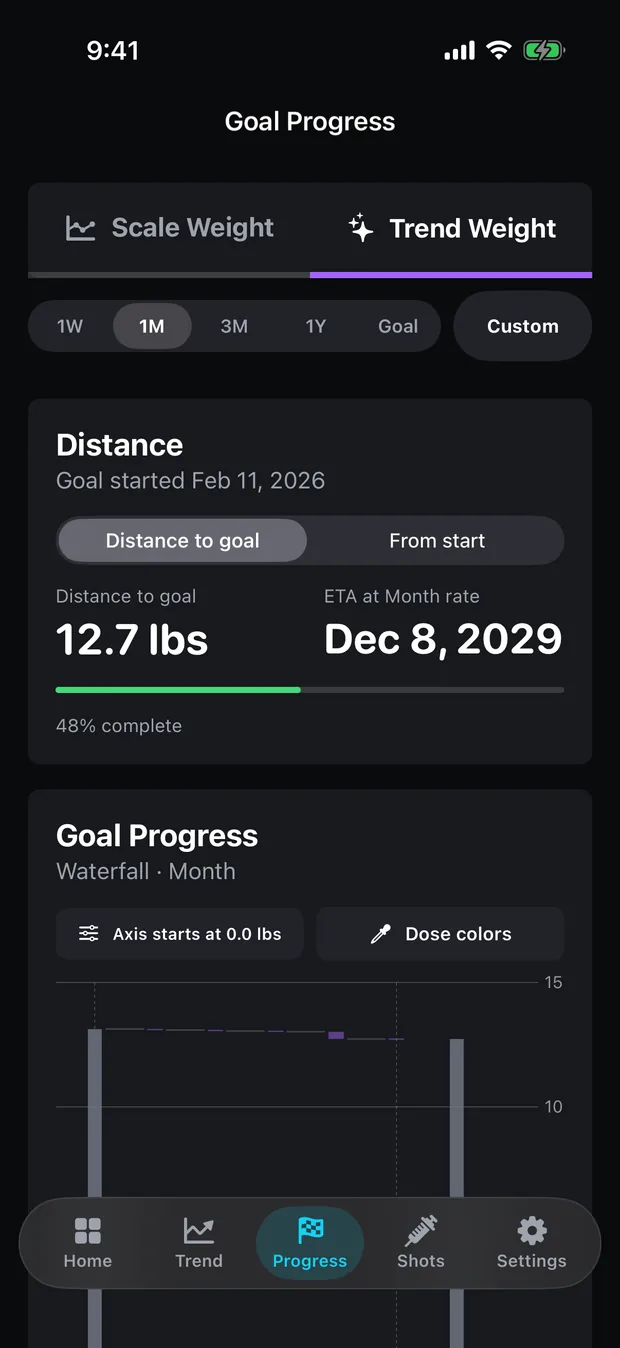
Enter a plan that works out faster than 1.5 lb per week and Peptrend’s Save button greys out with a message telling you why. That refusal, and the least-squares line behind every rate figure on the Progress tab, are the two design decisions worth understanding before you set a target. Everything else on the screen — the waterfall, the percentage, the finish date, the Analysis verdict — falls out of them.
What do you have to enter to set a weight goal?
The editor asks for a direction, a start date, a starting weight, a target weight, and one scheduling choice. Direction is Lose, Maintain or Gain. The footer under the first section states the contract plainly: the start date and start weight define 0% progress, so backdating a goal to a heavier morning inflates every percentage that follows.
Two further pickers decide which number the goal watches. Progress basis is “Scale (raw)” or “Trend (smoothed)”, and completion mode is “Scale reaches target” or “Trend reaches target”. Both default to trend. That default matters more than it looks: in one user’s log — 84 weigh-ins over 225 days — consecutive weigh-ins differ by 1.16 lb on average while the underlying drift is 0.098 lb/day, so the noise runs about 11.9 times the signal. A scale-basis goal will hit its target on a dehydrated Tuesday and lose it again on Thursday. Why you gain weight overnight covers where that noise comes from.
The goal seeded alongside that log is a filled-in example of all of it: Lose, target 175 lb, planned rate −1.0 lb/week (−0.5%/week), basis Trend, completion when the trend reaches target.
Can you set a goal by date instead of by rate?
You pick which end to pin down. The editor derives the other end live and shows it back to you before you save.
| Schedule mode | You enter | The editor derives and displays | What it says when the plan is too fast |
|---|---|---|---|
| Target weight + goal rate | A weekly rate, plus a planned-rate percent stepper | An “Implied ETA” — a calendar date | “Goal rate cannot exceed 1.5 lb/week.” |
| Target weight + target date | A calendar date | A “Required rate” in your display unit, and the same Implied ETA line | “That target date requires more than 1.5 lb/week. Choose a later date.” |
Date mode is the more useful of the two if you have a real deadline, because it turns the deadline into an arithmetic statement you can look at. Distance divided by weeks, in your units, printed under the picker. When that arithmetic fails the cap, the same line reads “Too fast or invalid date” and a red message underneath names the fix.
What gets stored either way is a single signed weekly rate in kilograms. A target-date goal resolves to its required rate the moment you tap Save, and the date is kept alongside it. The planned-rate percent saved alongside it is that rate divided by your starting weight, times 100. The seeded goal ships filed at −1.0 lb/week and −0.5%/week.
Why won’t the app let you set a 2 lb a week goal?
1.5 lb per week, in both directions, in both scheduling modes. The limit is defined in pounds and converted, so a kilogram user is held to 0.68 kg/week — though the validation message still names pounds, because the string is fixed. While any validation message stands, the Save button is disabled, so there is no path through the editor that stores a plan the app considers unsupportable.
The same mechanism carries the editor’s other refusals. A start date in the future is rejected. A Lose goal whose target is at or above the starting weight is rejected, as is a Gain goal whose target is at or below it. A non-Maintain goal with a rate of zero is rejected with “Set a goal rate greater than zero.”
A goal propagates further than anything else you type into the app: it sets the denominator for the progress percentage, the baseline for the weekly waterfall, and the planned rate the Analysis card measures your actual rate against. Let an impossible rate in at the top and every figure downstream inherits it, then reports you as permanently behind schedule. Enforcing once at the point of entry is cheaper than annotating every card afterwards.
How fast is too fast? What the published rates say
The cap sits above the half pound to a pound a week MedlinePlus calls safest, inside the band that page warns about — “losing more than 1 or 2 lb (0.5 to 1 kg) a week is not safe for most people” — and well above the average pace recorded in the STEP 1 semaglutide trial.
| Reference point | Rate | Note |
|---|---|---|
| Peptrend’s hard cap | 1.5 lb/week | 0.75%/wk at 200 lb; 1.0%/wk at 150 lb |
| MedlinePlus, Diet for rapid weight loss | 1/2–1 lb/week | “Losing more than 1 or 2 lb a week is not safe for most people” |
| Garthe 2011, slow-reduction group | 0.7% body weight/week | Lean body mass +2.1%; fat mass −31% |
| Garthe 2011, fast-reduction group | 1.4% body weight/week | Lean body mass −0.2%; fat mass −21% |
| STEP 1, semaglutide 2.4 mg (Wilding 2021) | −14.9% over 68 weeks | Adults with overweight or obesity; ≈ 0.22% of body weight per week, averaged. A drug result, not an app result |
| Peptrend’s Analysis caution | above 1.25%/week | Fires on Lose goals only |
The Garthe trial is the sharpest of these. Twenty-four elite athletes, all doing four resistance sessions a week, randomised to lose at 0.7% or 1.4% of body weight per week. Both groups lost about 5.5% of their weight. Only the slow group gained lean mass. Same total loss, different composition, and the variable was the rate.
A flat pound cap converts to a stricter percentage the heavier you are: 0.6%/week at 250 lb, a full 1.0% at 150 lb. The Analysis card carries a second threshold in percentage terms, at 1.25%/week on a Lose goal, so the two limits bind on different people. The cap is a guardrail on a piece of software, set with reference to the rates above. Those studies show where the number came from, and each describes the people enrolled in it.
Where does the weekly rate on the Progress tab come from?
On the Progress tab, the weekly rate is the ordinary least-squares slope of value against time in days, multiplied by 7. A line fitted through every point in the window, not the gap between its two ends. The suite contains a test whose entire job is to assert that, named testScaleWeeklyRateUsesRegressionNotEndpoints. The basis picker decides what goes into the fit: raw weigh-ins on the scale basis, smoothed trend values on the trend basis.
Then the guard. The window has to span at least three days between its first and last point or the function returns nothing at all. It does not widen the window to find more data, because a rate that quietly reaches outside its own window is worse than a blank.
This user’s log shows why three days rather than one. Fifty-six of its intervals are a single day long, and the widest of those moves 3.0 lb — a line fitted across that one day reads 21 lb per week. Two weigh-ins hours apart are worse still, because a regression over real timestamps divides by a fraction of a day and has no floor to stop it. An absurd slope like that would drive a nonsense finish date and trip the “losing faster than a typical conservative cut” caution off nothing but overnight water.
The Home screen’s goal card has no window picker, so it uses a self-selected one: a least-squares slope over the last 28 days on the scale basis, falling back to your last 10 entries if you log sparsely, and on the trend basis the last trend point’s own seven-day look-back.
How does the app work out a finish date?
Distance to goal, divided by the useful part of your current rate, rounded to whole days. That is the whole calculation. It returns nothing when the weekly rate is 0.01 kg or less in absolute terms, and nothing when the rate points away from the target, so a Lose goal that is gaining weight produces no finish date at all.
The app names the assumption on the card. It is labelled “Optimistic ETA”, with the footnote “Assumes the rate over {window} is sustained”, and on the Distance card it is called “ETA at {range} rate”. Change the time-frame picker and the date moves, because the rate feeding it moved.
Extrapolating a fat-loss rate in a straight line is about as generous as an assumption gets, which is the honest reason for the adjective. Whether a flat stretch is a plateau or water weight works through what actually happens to that line over months.
Where does the calorie deficit come from if you never log food?
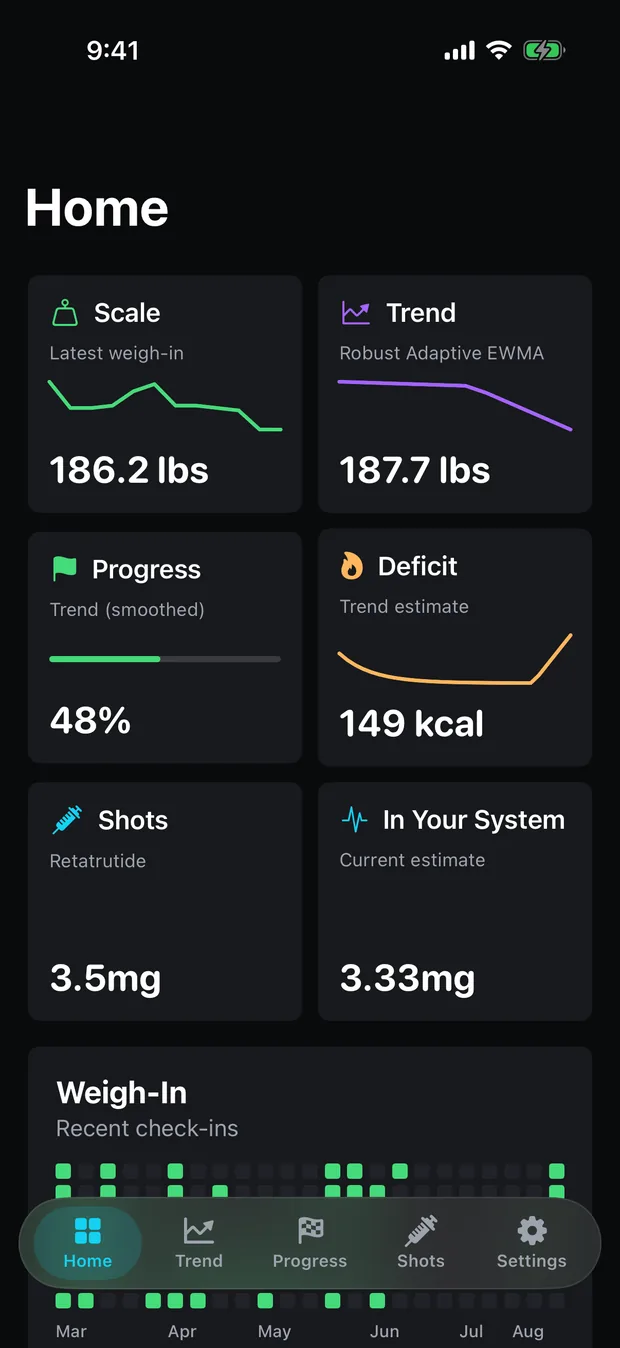
The formula is printed verbatim inside the app: kcal/day = lb per week × 3500 ÷ 7. Weekly trend change in pounds, times the energy density of a pound, divided across seven days. Positive is a deficit, negative a surplus. A trend moving at 0.30 lb per week comes out of that formula at 150 kcal a day.
The 3,500 constant is a setting, a stepper adjustable from 2,500 to 4,500 in steps of 50, and that range is not decoration. Kevin Hall’s 2008 analysis in the International Journal of Obesity found the required energy deficit per unit of weight loss is not a constant at all. It runs larger for people carrying more initial body fat, and it falls as a diet continues, because later loss carries proportionally more lean tissue and lean tissue is less energy-dense.
Hall and Chow returned to the rule in 2013 and located the deeper flaw in the static assumption behind it. Treating the energy deficit as a fixed quantity while the body adapts underneath it produces exaggerated predictions with no plateau. They allow that 3,500 is about right for a modest loss, and say that swapping in a corrected number does not repair the rule without handling those dynamics too.
The other half of what the figure cannot know is everything on the intake side. The app never sees what you ate: no food logging, no calorie entry. There is an “Assumed intake” stepper buried in settings, and no calculation in the app reads it. So the number describes what your scale did, expressed in calories, and it inherits every water-weight artefact in the trend underneath. What the trend filters do to a weigh-in log covers what smoothing does and does not remove; the fifteen trend methods disagree by up to 4.0 lb on that same log, so swapping one moves this figure too.
What does the Progress tab show for free?
Target weight, duration, distance to goal, percent complete and the Scale Actual Rate are free, the last of these because it is plain arithmetic on weigh-ins the free tier already owns. The weekly waterfall, the Optimistic ETA, the Trend Actual Rate and the Analysis verdict are Pro, as is the energy-deficit figure over on Home and Trend. What stays free sets out the whole line.
Setting a goal at all is free, and so is every weigh-in behind it. If you have been weighing yourself for years already, bringing that history in from Apple Health gives the regression a real window to fit on the first day rather than the fourth. The support page covers the rest of the setup.
Common questions
Why won't Peptrend let me set a 2 lb per week goal?
The goal editor caps any plan at 1.5 lb per week in either direction, and the Save button stays disabled while the plan exceeds it. The same limit applies whether you enter a rate directly or pick a target date that implies one.
Can I set a goal by date instead of by rate?
Yes. Choose 'Target weight + target date' and the editor works out the rate your date requires, shows it back to you, and refuses the date if that rate is above 1.5 lb per week. The date is stored with the goal, but the weekly rate it resolved to is what drives every projection afterwards.
Where does the calorie deficit figure come from if I never log food?
It is your weekly trend change converted to pounds, multiplied by 3,500 and divided by 7. The app never sees what you ate — it reads the deficit backwards off your trend line, using an energy density you can change from 3,500 to anywhere between 2,500 and 4,500 kcal per pound.
Why is my weekly rate blank on the Progress tab?
The window you picked spans fewer than three days of weigh-ins. Rather than reach outside the window for more points, the app reports nothing, because a regression fitted across a few hours turns a normal morning-to-evening swing into tens of pounds per week.
Sources
- Hall KD, What is the required energy deficit per unit weight loss? International Journal of Obesity (2008)
- Hall KD & Chow CC, Why is the 3500 kcal per pound weight loss rule wrong? International Journal of Obesity (2013)
- Garthe et al., Effect of two different weight-loss rates on body composition and strength and power-related performance in elite athletes, IJSNEM (2011)
- Diet for rapid weight loss, MedlinePlus Medical Encyclopedia
- Wilding et al., Once-Weekly Semaglutide in Adults with Overweight or Obesity, New England Journal of Medicine (2021)