Free GLP-1 tracker apps for iPhone: what each lets you do free
Most GLP-1 trackers are free to download; fewer say what stays free. On 18 September 2026, Shotsy's FAQ called its core features free, GlucoPal offered free use with an optional Pro tier, and Flat Six said 100% free. PeptidePal and Pep AI charge for tracking. Peptrend's dose and weigh-in logging, In Your System chart, Apple Health and iCloud sync are free, and its weight trend chart is Pro.
“Free” on the App Store usually means free to download. What a tracker lets you do before it asks for money is a different question, and the listings answer it with very different amounts of precision. This post reads what each app says about itself, in its App Store listing and on its own site, on 18 September 2026. Where an app does not say whether a feature is free, the post says that, because marketing copy leaves things out and nothing here comes from installing and paying for ten apps.
Which GLP-1 tracker apps say they are free to use?
Four make a clear free claim. Three sell a paid tier without saying where the line sits, and three list tracking among what a subscription buys.
| App | What the listing or site says about free use | Level estimate advertised |
|---|---|---|
| Shotsy | FAQ: free to download and use; dose and side-effect tracking, weight charts and nutrition logging at no cost; premium tools available | yes; tier not stated |
| GlucoPal (listed as Zepbound & Mounjaro Tracker) | “free to download and use, with no account required”; an optional Pro tier “unlocks advanced features” | yes; tier not stated |
| Peptide Tracker Log & Reminder (Flat Six) | “100% free. No subscription. No paywall.” The purchase panel lists founding-member and tip items | yes |
| Lilly Health | “at no cost”; no in-app purchases listed; covers the manufacturer’s own medicines | not advertised |
| Glapp | site: “a free native app”; the listing sells Glapp Max plans | yes; tier not stated |
| Glowise | listing describes Glowise Plus plans without saying what is free | yes; tier not stated |
| Peptide Tracker & Calculator | monthly and annual “Full App Access” plans, 3-day trial on annual | not advertised |
| MeAgain | listing: “Some features require a subscription”; FAQ lists shot and pill tracking among what MeAgain Premium includes | “medication-level context” |
| PeptidePal | “Protocol tracking, the full library, advanced analytics, and AI chat require a subscription” | yes |
| Pep AI | “A paid subscription is required to access Pep AI’s tracking features” | yes |
No prices appear above on purpose. The App Store’s In-App Purchases panel lists promotional, regional and test variants beside the real offer, so a single figure lifted from it describes nobody’s checkout. Each listing is the place to check the current offer.
What does “free” cover in each case?
Shotsy’s FAQ is the most specific of the large apps. It says the app is “completely free to download and use” and lists the core features that cost nothing, and it keeps “premium tools” for people who want more. Its listing advertises estimated medication levels for semaglutide, tirzepatide, liraglutide and dulaglutide, and it does not say which side of that line they sit on.
GlucoPal’s listing answers “Is GlucoPal free?” with a yes, no account required, and an optional Pro subscription. It advertises an estimated medication-level chart and weight “shown as a weekly trend”. It does not list what Pro adds.
Flat Six’s Peptide Tracker makes the strongest free claim in the set and backs it with a purchase panel that holds only founding-member and tip items. It advertises an estimated level curve for each compound, a weight trend, reconstitution and syringe-unit calculators, and a community forum.
At the other end, PeptidePal and Pep AI say plainly that tracking is paid, and MeAgain’s own FAQ lists shot and pill tracking among the things MeAgain Premium includes.
What is free in Peptrend?
Every record you make, and most of the charts drawn from them. The free tier covers:
- Every dose and every weigh-in, with the full history lists.
- The In Your System chart on the Doses tab and the In Your System card on Home: a milligram estimate from your doses and a published half-life. Only the chart’s “Dose colors” button is Pro.
- The Next Shot card with its countdown ring, and one local reminder when a dose is due.
- The raw weight chart on the Scale Data screen, every weigh-in plotted.
- Apple Health weigh-in sync in both directions, and iCloud sync through your own private database.
- JSON import and export, and the vial history with the count of doses drawn from each vial.
- On Progress: target weight, duration, distance to goal, percent complete, and a weekly rate computed from raw scale entries.
The source code explains one of those decisions in a comment beside the vial list: taking away a record someone already saved “is not a paywall, it’s a hostage.” What stays free walks through every gate screen by screen.
What does Peptrend Pro add?
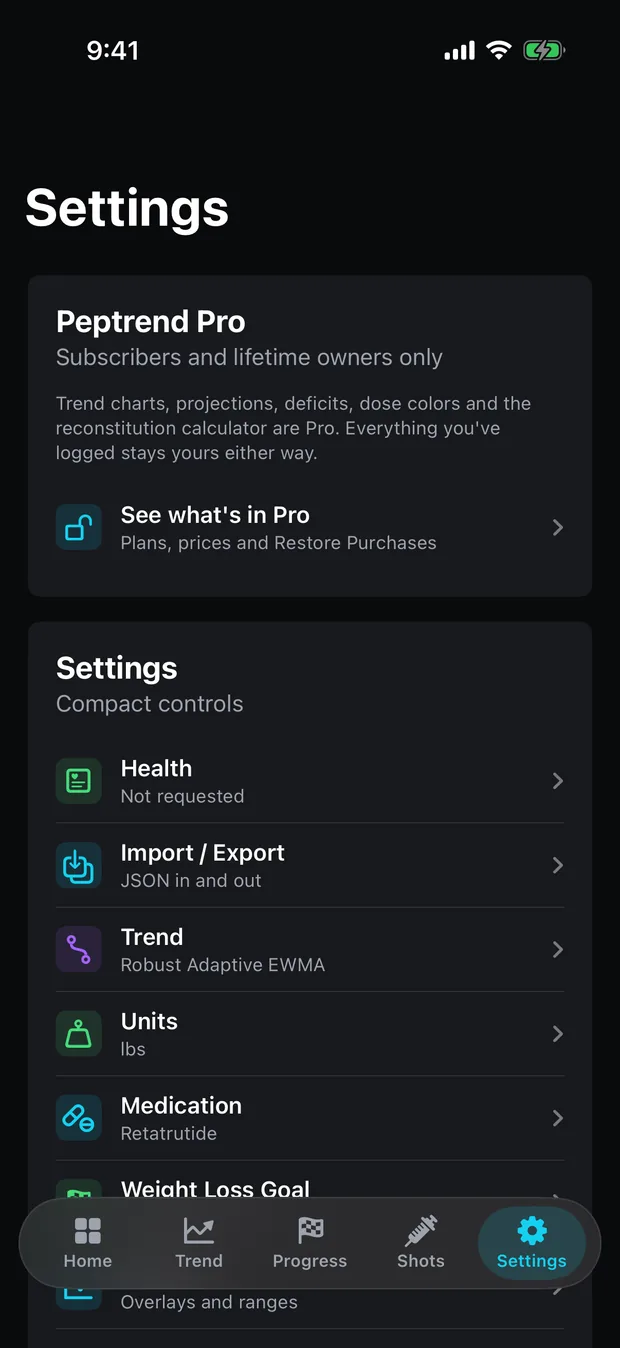
The weight trend line and everything built on it. The Weight Trend chart is Pro, and with it the smoothed current weight, weekly change, energy deficit, 30-day projection, the goal waterfall and the projected finish date. Pro also covers Advanced Mode, which opens all fifteen smoothing methods and their parameters, the reconstitution calculator (vial strength and water in, mg/mL out, and nothing more), the Dose Over Time chart, and the colour controls.
That is the honest limit of the free tier. It has no trend line. If a smoothed trend is the one thing you want without paying, GlucoPal and Flat Six both advertise weight trends, and neither listing says the trend sits behind a paywall.
Peptrend Pro is sold three ways on the App Store: $12.99 a month, $69.99 a year, or $99.99 once. The two subscriptions carry a 7-day free trial, and the app names the trial only after StoreKit confirms you are eligible for it. Lifetime has no trial.
Is a free level chart rare?
No. Eight of the ten apps in the table advertise some estimate of the medication in your system, and Flat Six’s is free by its own account. Where Peptrend’s differs is in what it shows you about the estimate. It names the model, a one-compartment curve with first-order absorption and elimination. It prints the half-life, time to peak and absorbed fraction it is using, links the FDA labels and papers behind most of its presets, and lets you edit all three. It scales a tablet by its absorbed fraction dose by dose, so a mixed history of injections and tablets adds up correctly. How much is still in your system explains the estimate and where it stops.
Does setup ask for money before you can log anything?
No. The welcome page asks you to tick a disclaimer box, and every page after it can be skipped. Three of them, the chart range, trend method and medication pages, carry a “Skip setup” button that ends setup at once. Whether you finish or skip out, setup ends on the Pro offer when there is a trial to show, and the offer has a “Not now” button. Either way, every free screen in the list above keeps working.
Reviews across this category complain about a long setup survey that ends at a price. Peptrend’s setup runs to about a dozen short pages and also ends on an offer, so the skips and the “Not now” button are worth knowing about before you start.
What does Peptrend not do at all?
Peptrend has no food logging, no side-effect journal beyond a 0 to 10 pain rating on injections, no progress photos and no PDF export. Shotsy, GlucoPal and MeAgain all advertise nutrition logging, and Shotsy advertises a PDF export for a doctor. Peptrend logs doses in milligrams only, with no mcg, IU or syringe-unit conversion. Its level chart follows one medication at a time. Shotsy advertises multiple simultaneous medications and PeptidePal and Flat Six advertise stacks. The reconstitution calculator stops at mg/mL and never works out a draw volume, by design.
If those gaps rule Peptrend out, the table above is a fair place to start. If what you want is a free dose log, a free level estimate, no account and a trend line you can check the maths of, the fifteen methods are public, and the privacy-label comparison and the 2026 roundup cover the rest of the field. Importing from Apple Health is the free way to bring a weight history across from another app.
Common questions
Is there a free GLP-1 tracker app for iPhone?
Several. On 18 September 2026 Shotsy's FAQ said its core features cost nothing, GlucoPal's listing described free use with no account and an optional Pro tier, Flat Six's Peptide Tracker said it was 100% free with no subscription, and Lilly Health was free with no in-app purchases. Peptrend logs every dose and weigh-in free, with the trend chart in Pro.
Is Peptrend's weight trend chart free?
No. The Weight Trend chart and everything computed from it are Pro. The free tier has a raw weight chart on the Scale Data screen, with every weigh-in plotted and no gate on it, plus distance to goal, percent complete and a scale-based weekly rate.
Is Shotsy free?
Shotsy's FAQ, checked 18 September 2026, says it is completely free to download and use, that dose and side-effect tracking, weight charts and nutrition logging cost nothing, and that premium tools are available. Its App Store listing advertises estimated medication levels without saying which tier includes them.
Which free GLP-1 tracker works without an account?
Peptrend has no account system at all, and GlucoPal's listing says no account is required. Both sync through your own iCloud. Glapp's site describes account sync across iPhone, Android and the web, which is the trade an account buys.
Sources
- shotsyapp.com — FAQ
- Shotsy GLP-1 Tracker on the US App Store
- GlucoPal (Zepbound & Mounjaro Tracker) on the US App Store
- Peptide Tracker Log & Reminder (Flat Six Labs) on the US App Store
- MeAgain: GLP-1 Tracker App on the US App Store
- meagain.com — FAQ
- PeptidePal — Peptide Tracker on the US App Store
- Pep AI: Peptide GLP-1 Tracker on the US App Store
- Glapp — Smart GLP-1 Tracker on the US App Store
- Lilly Health on the US App Store
- Peptrend on the US App Store