Missed or late GLP-1 dose? How to log what actually happened
Log a late dose at the moment you actually took it, and do not log a skipped dose as taken. Peptrend counts the next dose from your last taken one, so a late entry moves every date after it. Until then the Next card turns amber and counts days overdue. In the app's model, three days late leaves 74% of semaglutide's usual pre-dose amount. What to do about a missed dose is the prescriber's call.
A weekly dose taken on Wednesday instead of Sunday, or not taken at all, is a common entry in a real log. Peptrend has no special mode for it. The app logs what happened and recomputes everything from the timestamps you give it, so the useful question is how to enter it so the log stays true. Whether to take a missed dose, and when, is set out in each medication’s prescribing information and is a question for the prescriber.
How do you log a dose you took late?
Add it with its real time. The Add sheet’s When field takes a date and a time, and it can be set in the past, so a dose taken on Wednesday evening and logged on Thursday morning can still carry Wednesday evening. Leave Already taken? on.
The timestamp matters more than it looks. The level estimate draws each dose from the moment it is logged as taken, and the next-dose date is counted from the last taken dose. A late dose logged with the time you happened to open the app shifts both by however long you waited.
If you got the time wrong, edit the entry and change the date. Since version 1.4.0, saving a dose edit without touching its number keeps the stored amount exactly, so correcting a date cannot round the dose beside it.
How do you log a dose you skipped?
Do not log it as taken. You have two honest options: leave it out entirely, or add it with Already taken? switched off. An untaken entry stays in the dose history as a record that a dose was planned, but it is left out of the level estimate and the rate calculations, and the next-dose date ignores it.
The one entry that misleads is a skipped dose logged as taken. The estimate then carries milligrams that never went in, and the countdown restarts from a dose that never happened. What to log with every dose covers the taken toggle and the other eight fields.
How does the next-dose date move?
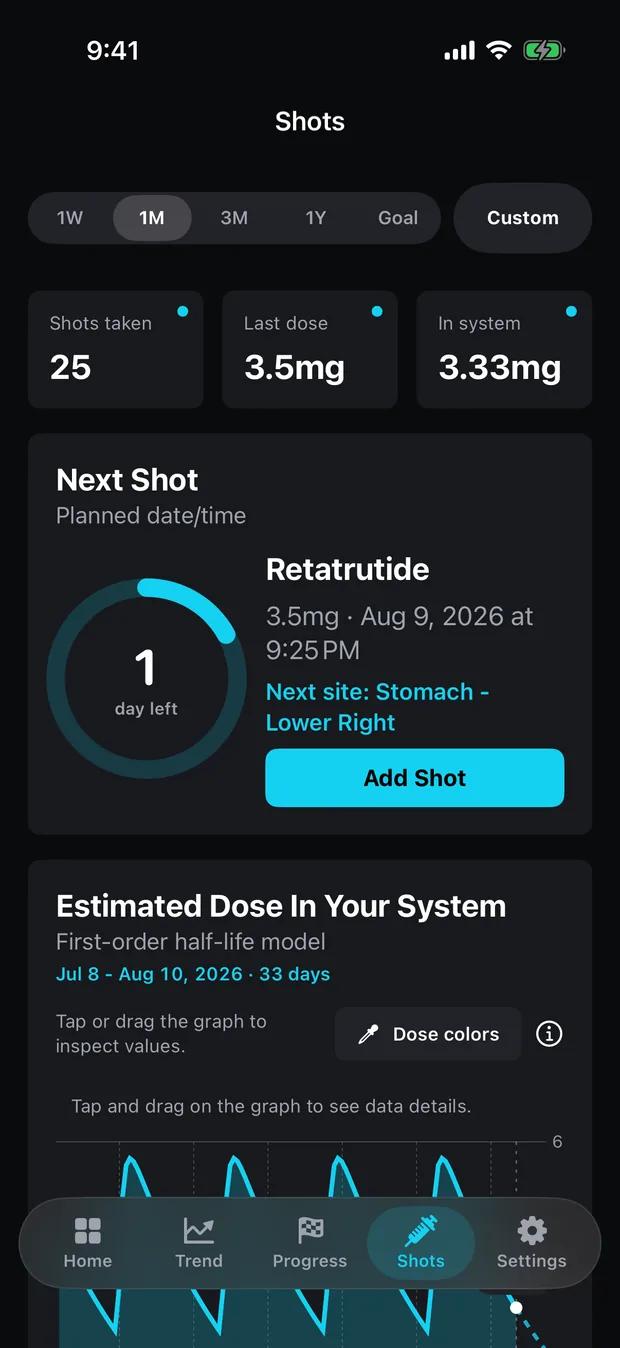
It follows your last taken dose: that dose’s date plus the medication’s interval. Take a weekly dose three days late and the Next card counts a week from the late dose, not from the original day. That is arithmetic on the log, not a recommendation. If you go back to your usual day, log that dose when you take it and the dates after it follow.
One exception exists. A schedule imported from another tracker can carry a planned next date, and the app uses it only while it is later than your last taken dose. Once you log past it, the last dose takes over again, so a stale imported date cannot hold the card hostage.
With more than one medication, each has its own clock. A medication taken alongside the main one drops off the card’s Also coming up list once it is a whole interval overdue, on the reasoning that something nobody is logging should not nag. Tracking two medications at once covers that list.
What does the Next card show while a dose is overdue?
The ring turns amber. On a weekly medication the centre of the ring shows the number of days overdue, the caption reads “days overdue” and the card’s subtitle reads “Was due” with the date. On a daily medication, where a day-level countdown would say “Today” all day, the ring counts hours instead: “hours overdue”.
The reminder does not repeat. Peptrend schedules one local notification for the next due dose, and a date already in the past is dropped rather than fired, so opening the app days later does not set off an alert for a dose you already know about. Logging the dose schedules the next reminder.
What does a late dose do to the level estimate?
The curve keeps falling until the dose is logged. The table runs the app’s own model for steady weekly injections at its semaglutide settings (7.0-day half-life) and tirzepatide settings (5.0 days), and shows the modelled amount just before the late dose as a share of the usual amount just before an on-time one.
| Days late | Semaglutide | Tirzepatide |
|---|---|---|
| 1 | 90.6% | 87.1% |
| 2 | 82.0% | 75.8% |
| 3 | 74.3% | 66.0% |
| 4 | 67.3% | 57.4% |
| 5 | 61.0% | 50.0% |
| 7, a whole dose skipped | 50.0% | 37.9% |
Each row is a share of a modelled milligram amount. It is not a blood level, it says nothing about how the medication is working, and it should not be read as a guide to what to do. The shorter half-life falls faster, which is the only thing the table is showing. How much is still in your system explains the model, and steady state covers why the regular pre-dose amount is where it is.
What will the app not do?
It will not tell you whether to take a missed dose, whether to take two close together, or whether to move your dosing day. Those rules exist, they differ between medications, and they are in each label’s dosing section. Peptrend reproduces none of them and does not try to apply them to your log.
It also cannot tell a late dose from a mistimed entry. If the When field says Wednesday, the app believes Wednesday. Keeping the timestamps true is what makes the curve, the countdown and the reminder agree with what happened. If they disagree with your log in some way this post does not explain, support is the place to say so, and what stays free confirms that none of this needs Pro.
Common questions
How do I log a GLP-1 dose I took late?
Add it with the When field set to the date and time you actually took it, and leave Already taken? on. The level estimate and the next-dose date both follow that time.
Should I log a dose I skipped?
Not as taken. Either leave it out, or add it with Already taken? switched off: an untaken entry stays in the history but is left out of the level estimate and the next-dose date.
What does Peptrend do when a dose is overdue?
The Next card's ring turns amber, the card reads 'Was due' with the date, and the centre counts days overdue, or hours for a daily medication. The reminder is not sent again for a date already past.
Does Peptrend tell me whether to take a missed dose?
No. The prescribing information for each medication has its own missed-dose instructions, and the prescriber can apply them to you. The app only logs what you did and draws estimates from it.