Tracking two medications at once in a GLP-1 dose log
Yes. Since version 1.5.0 Peptrend keeps one main medication and any number of others, each taken alongside or stopped. Every dose decays by its own medication's half-life, the In Your System chart draws one line per medication and never adds them, and the Next card lists each medication's next dose on its own clock. One reminder follows whichever dose is due first.
Peptrend logs more than one medication at a time. Since version 1.5.0 the app holds a main medication and a list of other medications, and every dose keeps the numbers of the medication it was logged as. Before that, the curve followed one medication name and left every other name out. The rest of this post covers how a second medication gets into the log, what each screen does with it, and the limits that stay.
How do you add a second medication?
Pick it when you log a dose. The Medication row on the Add sheet is a menu listing your medications, every preset and “Something else”. The first time you save a dose under a medication the log has not seen, the sheet asks one question: “Are you switching to it?”, with two answers, Switching to it and Taking both.
- Taking both keeps your main medication as it is. The new one gets its own line on the In System chart and its own next dose.
- Switching to it makes the new one your main medication, and the old one is marked as stopped. Its doses stay on every chart while it clears. Switching from semaglutide to tirzepatide walks through that case with numbers.
The same choice lives in Settings › Medication, which now has two cards. Main Medication holds what new doses start as, and what Home and the weight chart follow. Other Medications lists the rest, with an Add a Medication button for one you have not logged yet.
A medication from the preset list arrives with its published half-life, time to peak, absorbed share and interval. One typed in as “Something else” has no published numbers, so it starts on a week’s half-life and the app says so, until you set its own on the Medication screen.
What numbers does each dose decay by?
The numbers of the medication it was logged as, always. A semaglutide dose keeps its 7.0-day half-life after you start tirzepatide, and a tirzepatide dose decays by 5.0 days from the first one.
| Preset | Half-life | Time to peak | Absorbed share | Interval |
|---|---|---|---|---|
| Semaglutide (injection) | 7.0 days | 48 h | 100% | 7 days |
| Semaglutide (tablet) | 6.5 days | 1.5 h | 0.8% | 1 day |
| Tirzepatide | 5.0 days | 24 h | 100% | 7 days |
| Orforglipron | 1.6 days | 6 h | 77% | 1 day |
A brand and its generic count as one medication on both sides of every comparison. A dose imported as “Mounjaro” lands on the tirzepatide line, and an “Ozempic” dose sits on the semaglutide curve rather than drawing a second, identical line beside it. Semaglutide is the one generic with two presets, and the dose’s own route picks between them, so a tablet logged as “Semaglutide” gets the tablet’s peak and absorption.
Each other medication has a detail screen with its own steppers: half-life, peaks after, and the absorbed share whenever any of its doses was swallowed. If you change them, Use the label values puts the preset’s numbers back. Changing them redraws every chart those doses appear on and touches no logged dose.
Why are the curves never added together?
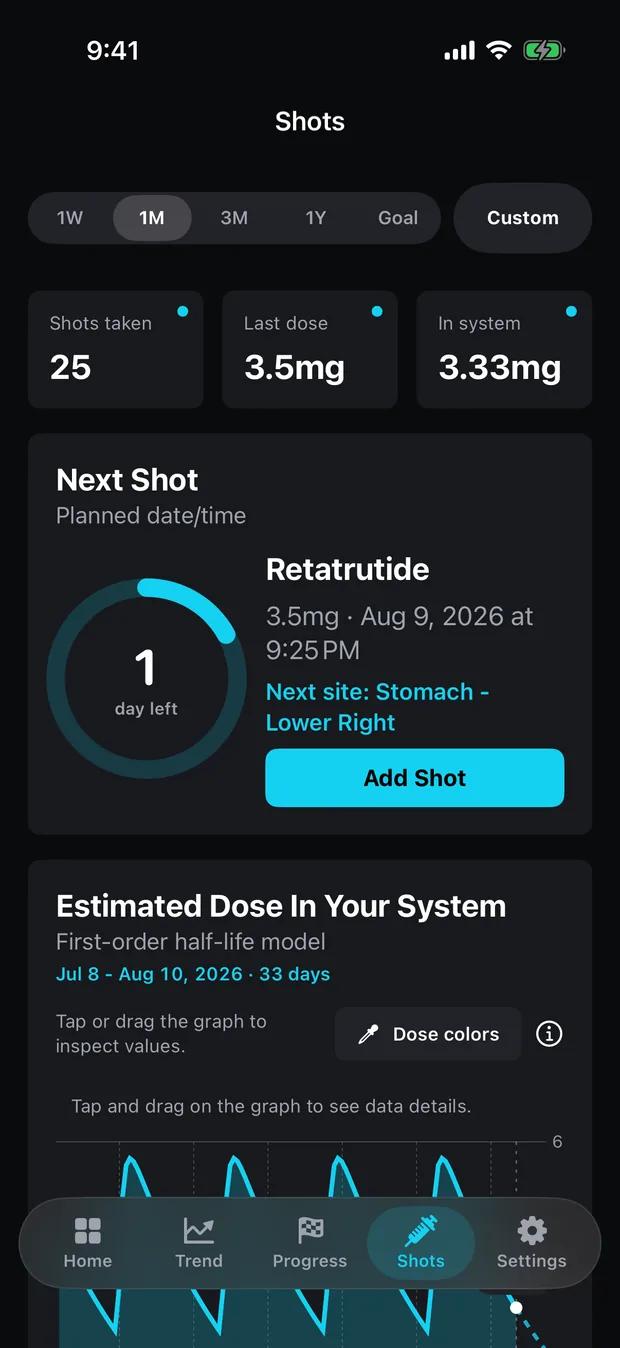
Because two milligram figures for two drugs are not one amount. Two milligrams of semaglutide and two of tirzepatide do not make four milligrams of anything, and the published half-lives, peaks and absorbed shares belong to each drug separately. So the In Your System chart draws one line per medication, and the readout under it names each one: the main medication’s current figure, then each other medication’s.
There is one way to get a single summed curve, and it is deliberate. When the medication named in Settings › Charts matches none of your doses, the chart reads 0.00 mg and offers a Count every dose button; pressing it draws one curve over every dose, each still decaying by its own medication’s numbers. Typing a medication name back into that field returns the separate lines.
A medication leaves the chart once it has cleared, which the app defines as nothing in the visible window or its projection reaching 1% of that medication’s own largest dose. A drug stopped two years ago does not sit on a one-month chart as a flat line along the axis.
Each line is the same estimate as before: a decayed and absorbed milligram amount from a one-compartment model with published constants. It is not a blood or plasma level, and the model has no volume of distribution that could produce one. How much is still in your system covers the model itself.
How does the app work out each next dose?
Each medication runs on its own clock: its own last taken dose plus its own interval. Before 1.5.0 the single next-dose date came from whichever dose was logged last, so a daily medication logged beside a weekly injection pushed the weekly one out to “a week from this morning” every day.
Now the Next card features whichever dose is soonest and lists the rest under Also coming up, each with its name, its last amount and its date. A row turns amber with “Was due” and the date once it is overdue. The Add button opens on the medication that is actually due.
A medication taken alongside drops off that list once it is a whole interval overdue. Nobody marked it stopped, but nobody is logging it either, and a permanent overdue line for something given up reads as nagging. Logging a fresh dose of a stopped medication puts it back on the list without a trip to Settings.
Which medication does the reminder follow?
Whichever dose is due next. Peptrend schedules one local notification at a time, replaced every time the dose history changes. With two medications that means the reminder names the soonest dose, and once you log it the app schedules the next one, which may belong to the other medication. An overdue dose does not swallow the reminder for tomorrow’s: the app picks the first dose still in the future.
There is no second, parallel reminder. Someone who wants a separate alert for each medication at its own time of day will not get that here.
What stays the same, and what does the app not do?
Home and the weight chart still follow the main medication. The In Your System card on Home shows the main medication’s figure, and the dose-in-system shading on a weight chart follows the medication named in Settings › Charts, which a switch sets to the new main one. The dose markers on a weight chart show every taken dose. With dose colours on, their colours come from milligrams alone, so a larger dose of one drug is coloured as heavier than a smaller dose of another.
A single injection holding two compounds is logged as one medication with one set of numbers. The app cannot split it into two curves.
And the app does not advise. It does not check whether two medications belong together, suggest a dose of either, or say what to do about an overlap. Five presets are research compounds and carry the app’s own flag, “Not FDA approved, research use only.” The doses you log and the arithmetic on them are all the app holds. What to log with every dose covers the fields each entry carries, what stays free lists what needs Pro (none of the above does), and support is the place to report a curve that looks wrong.
Common questions
Can Peptrend track two medications at the same time?
Yes. Since version 1.5.0 there is one main medication plus any number of others. Each keeps its own half-life, time to peak, absorbed share and dosing interval, and each can be marked as still taken or stopped.
Does the In Your System chart add the two medications together?
No. Each medication gets its own line. Milligrams of two different drugs are not one amount of anything, so a total would be a number with no meaning.
Which medication does the dose reminder follow?
Whichever dose is due first. Peptrend schedules one local reminder at a time, so with a weekly and a daily medication on the go it names the next one due, and moves on to the other once that dose is logged.
Is logging a second medication a Pro feature?
No. Logging doses, the In Your System chart and the Next card carry no Pro gate, whichever medication the dose belongs to.